
Introduction
Welcome to wordpressissuefix.com. If you are searching for a reliable SQL Injection Vulnerability Fix WordPress solution, you are in the right place.
What exactly does this mean? An SQL injection (SQLi) vulnerability is a database flaw where unauthorized users submit harmful code through your website’s input fields. You typically encounter this risk on login screens, contact forms, comment sections, or search bars. Why does it appear? It happens because a plugin, theme, or custom script fails to clean—or “sanitize”—user data before sending it directly to your WordPress database.
Resolving this is entirely manageable. This guide provides step-by-step, beginner-friendly instructions to patch this specific security gap and secure your website’s database.
Understanding the SQL Injection Vulnerability
Before you can effectively implement an SQL Injection Vulnerability Fix WordPress, it helps to understand how the database flaw works.
Your WordPress site runs on a MySQL database. When a legitimate user searches for a post or logs in, WordPress asks the database to retrieve that information using a language called SQL. If an input field is poorly coded, an attacker can type SQL commands into that field instead of a standard search term or username.
If the database executes those commands without filtering them, the attacker could view private data, create new admin accounts, or delete tables. Ensuring this cannot happen is the foundation of any SQL injection fix.
Step-by-Step SQL Injection Vulnerability Fix WordPress
If a security scanner has flagged your site for an SQL vulnerability, or you simply want to ensure your site is locked down, follow these beginner-safe steps.
1. Update Your Core, Themes, and Plugins Immediately
The vast majority of SQL vulnerabilities do not come from the core WordPress software, but rather from outdated plugins or themes. When security researchers find an SQL flaw in a plugin, the developer usually releases a patch immediately.
- Navigate to your WordPress dashboard.
- Go to Dashboard > Updates.
- Select all plugins and click Update Plugins.
- Repeat this process for your active and inactive themes.
- Ensure you are running the latest version of WordPress core.
Note: Keeping your software updated is the single most effective SQL Injection Vulnerability Fix WordPress site owners can perform.
2. Install a Web Application Firewall (WAF)
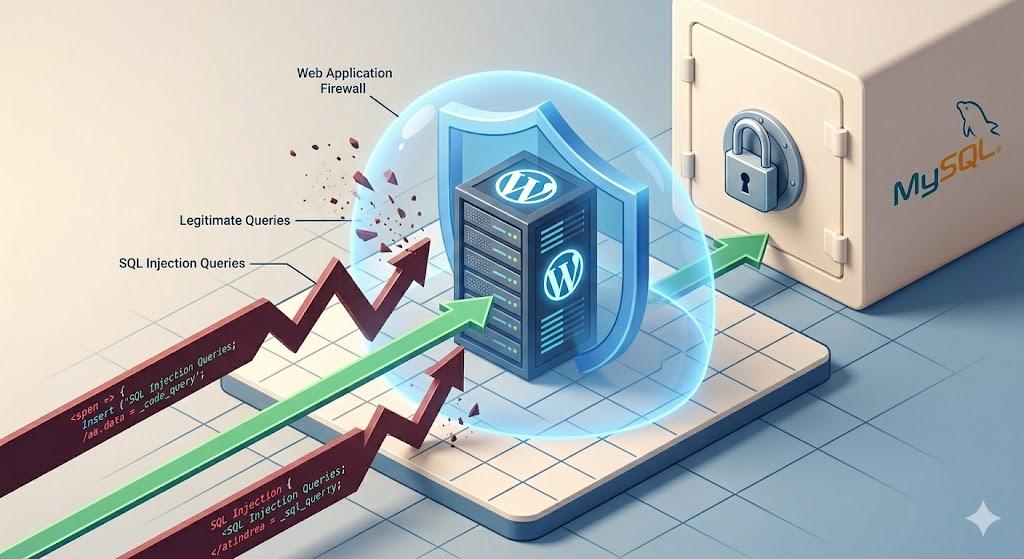
If a plugin has a vulnerability that hasn’t been patched yet by the developer, a Web Application Firewall acts as a protective shield. A WAF inspects all incoming traffic and blocks malicious SQL queries before they ever reach your database or input forms.
- Go to Plugins > Add New.
- Search for a reputable security plugin (e.g., Wordfence Security, Sucuri Security, or Solid Security).
- Install and activate the plugin.
- Follow the setup wizard to enable the firewall. These plugins automatically detect and block common SQL injection patterns.
3. Delete Unused or Abandoned Plugins
Sometimes, an SQL Injection Vulnerability Fix WordPress simply requires removing the source of the problem. If you have plugins installed that haven’t been updated by their developers in over a year, they are a massive security risk.
- Review your installed plugins list.
- Identify any plugins that show a warning: “This plugin has not been tested with your current version of WordPress.”
- Deactivate and delete these plugins.
- Find modern, actively maintained alternatives to replace their functionality.
4. Secure Your Database Prefix (Preventative Step)
By default, WordPress tables begin with wp_. Automated SQL injection bots often target tables assuming they use this exact prefix. Changing it makes it much harder for automated scripts to guess your database structure.
- You can change your database prefix using a trusted security plugin or a dedicated database tool like Brozzme DB Prefix.
- Always backup your database before making this change.
- Change the prefix to something random, like
wp_a7x9_.
Technical Explanation: How Developers Fix SQL Injection
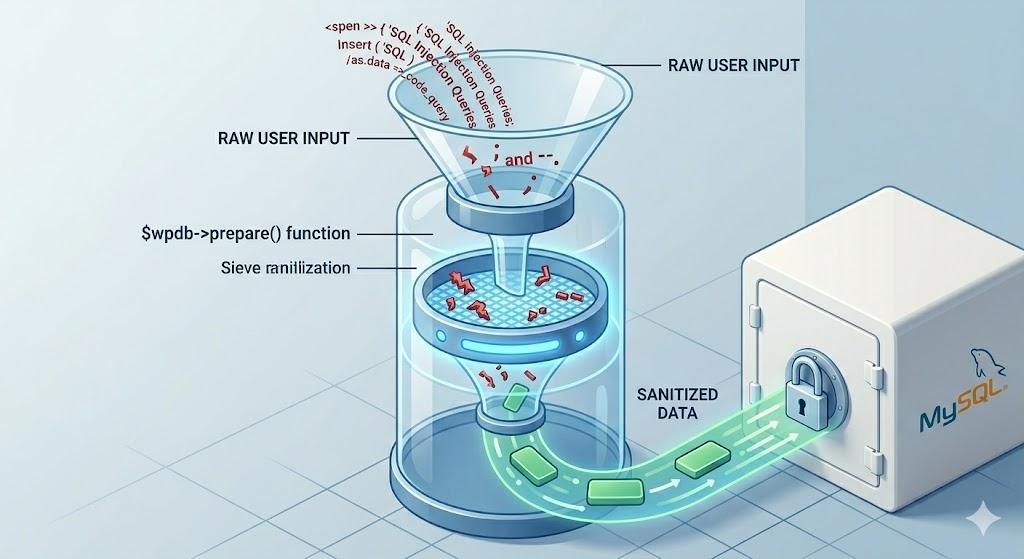
If you are a site admin who writes custom code, creates custom forms, or develops themes, you must understand how to fix SQL injection at the code level.
The official WordPress method for preventing SQL injection is called Data Sanitization and Prepared Statements.
When interacting with the database using the $wpdb class, you must never pass raw user input directly into your SQL query. Instead, you must prepare the statement. The $wpdb->prepare() function acts as a filter, ensuring that whatever the user types is treated strictly as plain text, not as an executable database command.
What NOT to do (Vulnerable):
Querying the database directly with an unfiltered variable like $_GET['user_input'] creates an immediate SQL injection vulnerability.
What to do (The Fix):
Always wrap your database queries in $wpdb->prepare(). This function forces WordPress to sanitize the data, safely neutralizing any malicious SQL characters before the database processes the request.
Recognizing the Symptoms of a Database Breach
If you are searching for an SQL Injection Vulnerability Fix WordPress, you might be worried that your site has already been compromised. Look out for these signs:
- Unknown Admin Accounts: Check Users > All Users. If you see administrators you did not create, an SQL injection may have been used to bypass authentication.
- Redirects: Your website visitors are being redirected to spam or malicious websites.
- Modified Content: Posts or pages have been altered with spam links.
- Database Errors: You suddenly start seeing “Error establishing a database connection” or syntax errors on your front end.
If you spot these, restore your website from a clean backup immediately, change all database and WordPress passwords, and then apply the firewall and update steps listed above.
Understanding the Common Types of Malware in WordPress (And How to Fix Them)
Frequently Asked Questions (FAQ)
Can an SSL certificate prevent an SQL injection?
No. An SSL certificate encrypts data traveling between the user’s browser and your server (preventing eavesdropping). It does not filter or sanitize the data being entered into your database. You still need an SQL Injection Vulnerability Fix WordPress strategy even with an SSL.
Why did my security scanner flag a specific plugin for SQLi?
Security scanners reference databases of known vulnerabilities. If a plugin you have installed matches a known flawed version, the scanner will alert you. Updating or deleting that specific plugin will instantly fix the issue.
Is this guide safe to follow?
Yes. This guide is for educational troubleshooting purposes. All the methods described—updating software, using a WAF, and preparing database statements—are industry-standard, beginner-safe best practices for WordPress security.